Updated . Built against the tool’s current screens and checked step by step. How we check this lesson
Month-end bank reconciliation is the job nobody wants and everybody needs done: tick off every bank row against the books, explain every difference, and prove both balances agree. It is slow, and when it is rushed, a duplicate entry or a missing deposit slips into the profit and loss. In this free, interactive lesson you give ChatGPT the bank statement and the ledger export, have it match the rows and list every exception with a reason, check its work against the file, and paste a clean summary into the month-end file. You also add the numbers up yourself, because AI can add wrong.
At a glance
| Question | Answer |
|---|---|
| What you build | Upload the bank statement and the books, let ChatGPT match every row and list the exceptions, then check the answer and paste a reconciliation summary into the month-end file. |
| Tools | ChatGPT |
| Time | About 12 minutes, 19 steps in 5 parts |
| Level | Beginner, no coding needed |
| Cost | Free |
| Ways to learn it | Practice it step by step |
The 5 parts, in short
- Upload both files: Open the plus menu, Add photos & files, Pick the bank statement, Add the ledger export, and 1 more step.
- Match the rows: Click the message box, Ask it to match and list the exceptions, Send it, Read the exceptions.
- Check its answer: Open the ledger file, Close the preview, Add up the four exceptions.
- Build the summary: Click the message box, Ask for the summary table, Send it, Copy the table.
- Check the math yourself: Check the bank side, Check the books side, Read the to-do notes.
Start here first: Turn a Client Meeting into Action Items and a Follow-Up Email (Accounting Firms) (module 1 of AI Automation for Accounting & Bookkeeping Firms)
Part of: AI for Accounting & Bookkeeping Firms (step 8 of 42). Next up: Collect Overdue Invoices Faster using ChatGPT
Part of: AI for Finance Teams (step 3 of 24). Next up: Collect Overdue Invoices Faster using ChatGPT
Part of: AI Back Office for Small Business (step 10 of 22). Next up: AI Contract Review in 10 Minutes using Foxit AI
The business case: what month-end costs today
Picture a bookkeeper who looks after twelve small-business clients. Each one has a checking account, and each month the bank statement has to be matched against the books. If one account takes about three hours, that is 36 hours a month, close to a full work week, spent mostly on ticking off rows that were never going to be a problem. The figures are an illustration, not a benchmark: your accounts may be quicker or slower, and accounting software already matches a lot of rows by itself.
The cost is not only time. Bank reconciliation is where errors get caught: a deposit that never made it into the books, a bill entered twice, a fee nobody recorded. When the work is rushed at the end of a long close, those are the rows that get missed, and a missed row means the cash balance and the profit and loss are wrong for the client. Matching 80 rows by eye is exactly the kind of repetitive comparison where a tired person drifts.
What changes: ChatGPT does the row-by-row matching and hands you a short list of exceptions with reasons. You spend your time on the four rows that need judgment, not the 76 that don't. In the lesson, the matching takes one request instead of an afternoon, and the whole job, including checking the answer and the math, is about 20 minutes.
The example: Harbor Lane Studio's September
Harbor Lane Studio is a made-up small design studio. For September 2026 you have two CSV files: a bank statement with 40 rows, and a ledger export from the accounting software with 40 rows. Both started the month at $48,210.37. The bank ends at $55,205.65 and the books end at $50,835.15, a gap of $4,370.50 that has to be explained.
Four things are planted in the files, the same kinds of differences real months produce: a customer deposit that is on the bank statement but was never recorded, a monthly service fee the bank took that isn't in the books, a supplier bill that was entered twice, and a check written on September 29 that hasn't cleared yet.
Download the two sample files and follow along in ChatGPT: [bank-statement-sep-2026.csv](/content/files/chatgpt-bank-reconciliation/bank-statement-sep-2026.csv) and [ledger-export-sep-2026.csv](/content/files/chatgpt-bank-reconciliation/ledger-export-sep-2026.csv). They are plain CSV files with made-up companies, so they are safe to upload anywhere.
Who this lesson is for
Bookkeepers, staff accountants and small-business owners who reconcile accounts themselves each month, and the firm owners who review that work. You don't need formulas or code, and you don't need a ChatGPT account to practice here. It is the fifth module in the AI Automation for Accounting & Bookkeeping Firms block, and it pairs well with the Analyze a Client's P&L Export lesson that comes before it.
What ChatGPT found, and what you do about each row
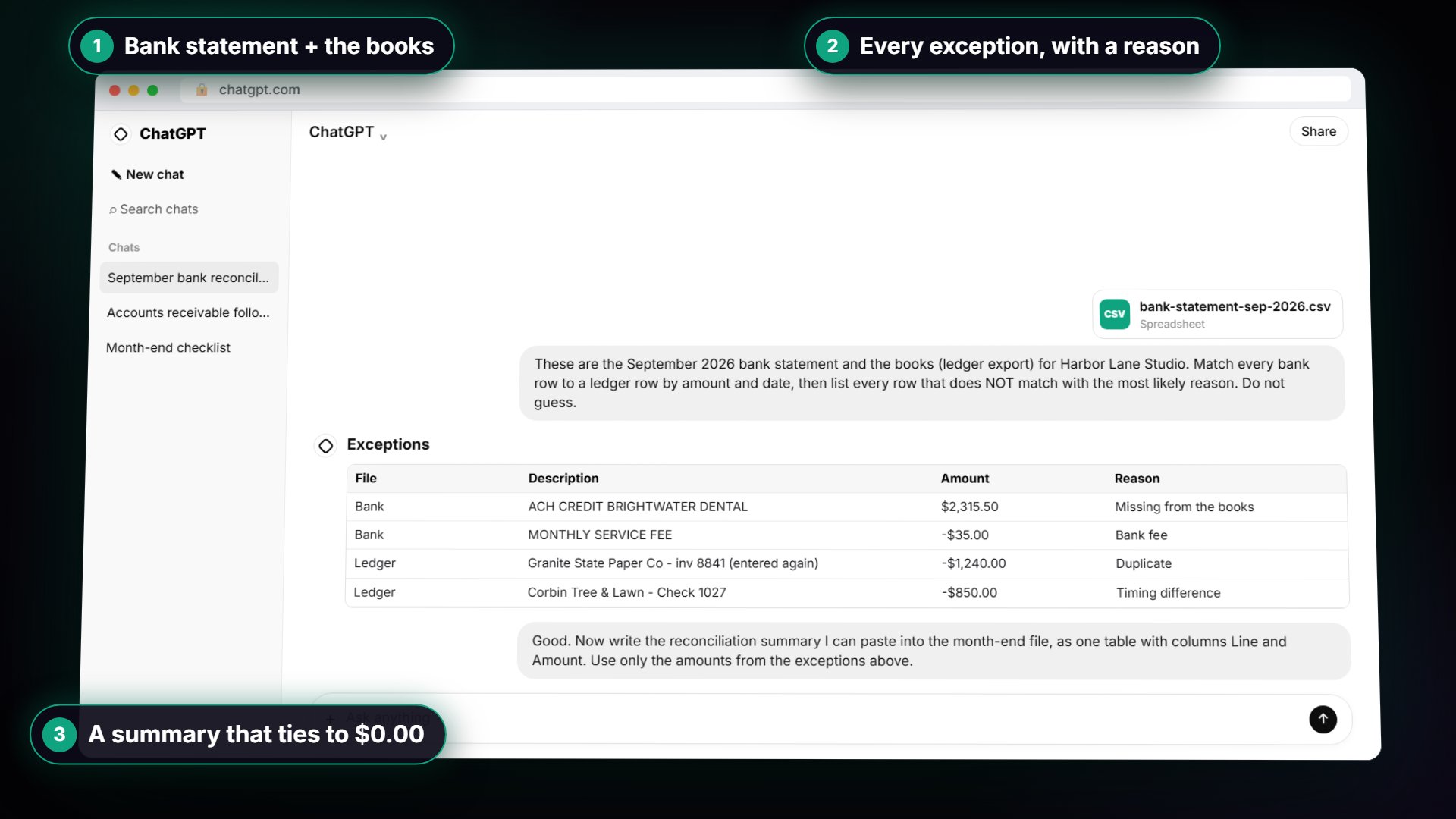
In the real run the four exceptions came back with the right reasons: the Brightwater Dental deposit of $2,315.50 is missing from the books, the $35.00 monthly service fee is a bank fee, the second Granite State Paper entry for $1,240.00 is a duplicate, and check 1027 to Corbin Tree & Lawn for $850.00 is a timing difference.
The reasons tell you the next move. A missing deposit and a bank fee each need an entry in the books. A duplicate needs to be removed or reversed. An outstanding check needs nothing: it clears in October, and you carry it as a reconciling item. Only three of the four need you to touch the accounting software, and the summary table's notes say which.
Check the math yourself
ChatGPT can add wrong, and a reconciliation that is off by a few dollars is worse than none, because it looks finished. So the lesson makes you do the arithmetic. Bank side: $55,205.65 minus the $850.00 outstanding check is $54,355.65. Books side: $50,835.15 plus the $2,315.50 deposit, minus the $35.00 fee, plus the $1,240.00 duplicate you remove, is $54,355.65. When both sides land on the same number, the reconciliation is real.
For many file questions ChatGPT writes and runs code on your data, which is why the row matching can be exact. You can open the code it ran, and OpenAI recommends reviewing the output and assumptions before you rely on a result. If a total doesn't tie, ask ChatGPT to show the rows behind it.
What this saves you
- Time: the matching, which is the slow part, takes one request. You spend your minutes on the exceptions.
- Fewer misses: a duplicate entry or missing deposit is far more likely to be caught when every row has been compared than when someone skims for them at the end of a long close.
- A cleaner file: the summary table follows the standard reconciliation layout, so the reviewer sees the same thing every month.
- What it does not replace: your judgment on each exception, recording the entries in your accounting software, and your sign-off. This is general information; ask your accountant or CPA how your own close should work.
Gotchas
- Give it the balances. With the opening and ending balances in the request, ChatGPT can prove its own list explains the gap. Without them you can't tell if it missed something.
- Make it say "Needs review". Telling it not to guess keeps an ambiguous row from being forced into a match. Bank rows that just say DEPOSIT with no payer are matched by amount and date, so check a few.
- Watch the dates. A five-day window catches normal clearing delays, but a check written in August that clears in September needs a note to ChatGPT about it.
- Protect client data. Follow your firm's policy on AI tools, use a business plan such as ChatGPT Business or Enterprise, which OpenAI doesn't use to train its models by default, and delete account numbers from the export before you upload it.
Next business case: accounts receivable follow-ups
Once the bank side is clean, the next place small businesses lose time is chasing unpaid invoices. The same pattern works: upload the aged receivables report, ask ChatGPT to rank who to chase first by amount and days overdue, and have it draft a polite reminder for each. You decide, it drafts. Learn the term first in accounts receivable.
Try it yourself, free
Reading the steps is a start. Doing them is how it sticks. The interactive module walks you through every click in a practice copy of ChatGPT, checks each step, and never touches your real accounts.
Start “Month-End Bank Reconciliation with ChatGPT: 20 Minutes, Not 3 Hours”Step by step: Month-End Bank Reconciliation with ChatGPT: 20 Minutes, Not 3 Hours
All 19 steps of the interactive module, in order. In the module you watch each one, then do it yourself in a practice copy that checks your work.
1. Upload both files
- Open the plus menu. Harbor Lane Studio is closing September. You have the bank statement and the books, both as CSV files. Click the + button on the left of the message box.
Harbor Lane Studio is closing September. You have two files: the bank statement, and an export of the books. Doing this by hand means ticking off eighty rows, and that takes hours. Let's give both files to ChatGPT.
- Add photos & files. Click Add photos & files.
- Pick the bank statement. Click bank-statement-sep-2026.csv.
- Add the ledger export. Hold Ctrl and click ledger-export-sep-2026.csv so both are selected.
Now hold Control and click the ledger export, so both files are picked.
- Open them. Click Open.
Both files sit above the message box. You can also drag them onto the chat.
2. Match the rows
- Click the message box. Give ChatGPT the numbers it needs to check itself. Click the message box.
Don't just say reconcile this. Give ChatGPT the starting balance and both ending balances, so it can check its own work.
- Ask it to match and list the exceptions. Paste in the request. It gives both ending balances, asks for a match within 5 days, and asks for every row that does not match, with a reason. It also says: do not guess.
This request gives the balances, tells ChatGPT how to match, and asks for a table of every row that does not match, with a reason. The last line matters most: if you are not sure, say Needs review.
These are the September 2026 bank statement and the books (ledger export) for Harbor Lane Studio. Both started September at $48,210.37. The bank statement ends at $55,205.65 and the ledger ends at $50,835.15. Match every bank row to a ledger row by amount and date, allowing up to 5 days apart, since the descriptions are worded differently. Then list every row that does NOT match as a table with these columns: which file, date, description, amount, and the most likely reason (duplicate, timing difference, missing from the books, bank fee, or Needs review if you are not sure). Do not guess: if a row could be two things, say Needs review.
- Send it. Click Send.
ChatGPT reads both files and runs a little code to match the rows. This is the part that used to take you hours.
- Read the exceptions. It matched 38 of 40 rows and found four that do not. Click the exceptions table.
It matched thirty-eight of forty rows on each side, and left four exceptions. A missing deposit, a bank fee, a duplicate, and a check that has not cleared.
3. Check its answer
- Open the ledger file. Do not take it on trust. Click ledger-export-sep-2026.csv in your message to look at the duplicate yourself.
Now check its work. Never sign off on a reconciliation you have not looked at.
- Close the preview. The Granite State Paper bill appears twice on 12 September, both -1,240.00. The bank only paid it once. Click the X to close.
There it is. The Granite State Paper bill is in the books twice, but the bank paid it once. ChatGPT was right. Close the panel with the X.
- Add up the four exceptions. The gap is $4,370.50. Add the four: 2,315.50 + 35.00 + 1,240.00 + 850.00 = 4,370.50. They explain all of it. Click the balances.
The gap between the two balances is four thousand three hundred seventy dollars and fifty cents. Add the four exceptions yourself: twenty-three fifteen fifty, plus thirty-five, plus twelve forty, plus eight fifty. That is the same number, so nothing is hiding.
4. Build the summary
- Click the message box. Now the page you paste into the month-end file. Click the message box.
Now turn that into the page you keep in the month-end file.
- Ask for the summary table. Paste in the request: one table, in the usual reconciliation order, plus a note on what to do for each exception.
Ask for one table in the usual order: bank side first, then books side, then the difference. Then a short note for each exception saying what to do in the books.
Good. Now write the reconciliation summary I can paste into the month-end file, as one table with columns Line and Amount, in this order: Balance per bank statement; Less: outstanding checks; Adjusted bank balance; Balance per books; Add: deposit not yet recorded; Less: bank fee not yet recorded; Add back: duplicate entry; Adjusted book balance; Difference (should be 0.00). Use only the amounts from the exceptions above. Under the table, add a one-line note for each of the four exceptions saying what I need to do in the books (or nothing, if it is only timing).
- Send it. Click Send.
- Copy the table. Click the copy icon at the top right of the table, then paste it into your month-end file.
ChatGPT shows the summary as a table card. It keeps the rows and columns.
5. Check the math yourself
- Check the bank side. AI can add wrong, so use a calculator. 55,205.65 - 850.00 = 54,355.65. Click the Adjusted bank balance row once yours agrees.
AI can add wrong, so add it yourself. Fifty-five thousand two hundred five sixty-five, minus eight fifty, is fifty-four thousand three fifty-five sixty-five. If yours agrees, click the adjusted bank balance.
- Check the books side. 50,835.15 + 2,315.50 - 35.00 + 1,240.00 = 54,355.65. Click the Adjusted book balance row once yours agrees.
Now the books side. Fifty thousand eight thirty-five fifteen, plus the deposit, minus the fee, plus the duplicate, is the same fifty-four thousand three fifty-five sixty-five. Both sides agree, so the difference is zero.
- Read the to-do notes. Three need an entry: record the deposit, record the fee, remove the duplicate. The outstanding check needs nothing. Click the notes.
The notes are your to-do list. Record the deposit, record the fee, and remove the duplicate. The outstanding check needs nothing, because the bank will clear it in October. Make those entries in your accounting software, and the month is reconciled.
Frequently asked questions
- Is there GPT invoice or bank reconciliation software?
- You can use ChatGPT itself: upload the bank statement and the ledger (or your invoice list) as CSV files, ask it to match rows by date, amount and reference, and list everything that does not match. That is the method this lesson practices. Some accounting tools also add AI matching. Either way, check the totals yourself and keep your accounting software as the record.
- Can ChatGPT do a bank reconciliation?
- It can do the matching and the first list of exceptions well. Upload the bank statement and the ledger export as CSV files, give it the opening and ending balances, and ask for every unmatched row with a reason. You still check its answer, decide what to do about each exception, record the entries in your accounting software and sign off.
- How do I reconcile a bank statement to the ledger with AI?
- Export both as CSV, upload them to ChatGPT, and ask it to match each bank row to a ledger row by amount and date within a few days. Ask for a table of the rows that don't match, each with a likely reason, then add the exceptions up and confirm they explain the difference between the two balances.
- Is it safe to upload bank statements to ChatGPT?
- Follow your firm's policy first. Business and Enterprise plans are not used to train OpenAI's models by default. On any plan, remove account numbers and anything the matching doesn't need. The sample files in this lesson are made up, so you can practice with them freely.
- What if ChatGPT's totals are wrong?
- Add them up yourself, as the lesson does. Check the adjusted bank balance and the adjusted book balance with a calculator. If they differ, ask ChatGPT to list the rows behind each number, or open the code it ran, and look for a row it skipped.
- Does this replace my accounting software's bank feeds?
- No. Bank feeds and rules in QuickBooks, Xero and similar tools match many transactions automatically, and they are where the entries get recorded. ChatGPT helps most when you have a messy file, a month that doesn't tie, or you want a second pair of eyes on the exceptions.
- Is this lesson free?
- Yes. Stepthrough is free and the practice copy needs no accounts. To do it for real you need your own ChatGPT account; file uploads have usage limits that depend on your plan.
More in AI Automation for Accounting & Bookkeeping Firms
 Turn a Client Meeting into Action Items and a Follow-Up Email (Accounting Firms)
Turn the transcript of a client's quarterly review into the decisions, an action items table with owners and due dates, and a follow-up email to the client.
Free · Live ~9 min Beginner
 Answer Refund-Date Emails Without Overpromising using ChatGPT
A client wants a refund date while two tax forms are still missing. Give ChatGPT the thread and your firm's facts, catch the date it shouldn't promise, and send a calm…
Free · Live ~10 min Beginner
 Analyze a Client's P&L Export with ChatGPT (Accounting & Bookkeeping Firms)
Upload a client's Profit and Loss Detail export to ChatGPT, catch duplicate bank-feed entries and uncategorized rows first, then get a monthly P&L summary, a chart and…
Free · Live ~11 min Beginner
 GoSwift: Build a Client Onboarding Tracker by Describing It for Accounting & Bookkeeping Firms
New clients get onboarded from a spreadsheet and an inbox, and nobody can see which documents are still missing. Describe the tracker to GoSwift’s AI builder, review…
Free · Live ~10 min Beginner
 MonstarX: Turn New-Client Emails into an Intake Form and Tracker for Accounting & Bookkeeping Firms
New clients send their details by email and phone, and someone retypes them into a spreadsheet. Describe an intake app to MonstarX, answer its seven planning questions…
Free · Live ~8 min Beginner
◷Collect Overdue Invoices Faster using ChatGPTUpload your aging report, have ChatGPT build this week’s chase list (oldest and biggest first, disputes held back), check it against the file, then draft a friendly…
Free · Live ~12 min Beginner
All 15 modules in AI Automation for Accounting & Bookkeeping Firms
More ChatGPT tutorials
 Get On-Brand Social Posts Every Time using a ChatGPT Custom GPT
See why generic prompts give generic results, then build a Custom GPT loaded with your brand voice and watch the output transform.
Free · Live ~8 min Beginner
 Prompt Writing 101: Role, Context, Task, Format
Ask ChatGPT for the same customer email twice, once vaguely and once with a four-part prompt, and see exactly why structure gets a better answer.
Free · Live ~8 min Beginner
◷Send a Same-Day Follow-up After Every Discovery Call using ChatGPTTurn a discovery call transcript into the decisions, the next steps with owners and dates, deal notes for your CRM, and a follow-up email the prospect gets the same…
Free · Live ~7 min Beginner
◷Hold Your Price When a Prospect Asks for a Discount using ChatGPTA prospect wants 30% off and a free month to sign this week. Give ChatGPT the thread and your pricing rules, catch the discount you can't approve, and send a reply that…
Free · Live ~9 min Beginner
 Get Your Business Recommended by ChatGPT
Ask ChatGPT who it recommends in your town, see which pages it trusts, then use it to write an FAQ page and Business Profile copy that answer real customer questions.
Free · Live ~10 min Intermediate
◷Run a Weekly Ops Review Where Every Task Has an Owner using ChatGPTTurn a weekly operations and vendor review into the decisions, the next steps with owners and dates, the risks to watch and a team recap, without turning a vendor's…
Free · Live ~7 min Beginner
Same business, other tools
Harbor Lane Studio shows up in these modules too, built with different tools.
From the blog
How to Balance a Trial Balance That Doesn't BalanceHow to balance a trial balance when debits and credits don't agree: what goes on it, six checks in order, the divide-by-9 trick and where AI helps.
Oct 21, 2026 5 min read
 How to Add AI to Finance Workflows Without Rebuilding
The most effective ways to add AI to existing finance workflows: start with exports, add one AI step to the inbox you have, and keep people on approvals.
Oct 21, 2026 4 min read
ChatGPT Bank Reconciliation Mistakes to AvoidEight mistakes bookkeepers make reconciling a bank statement with ChatGPT, from "reconcile this" with no balances to trusting its math, and fixes.
Oct 20, 2026 6 min read
Visual guide
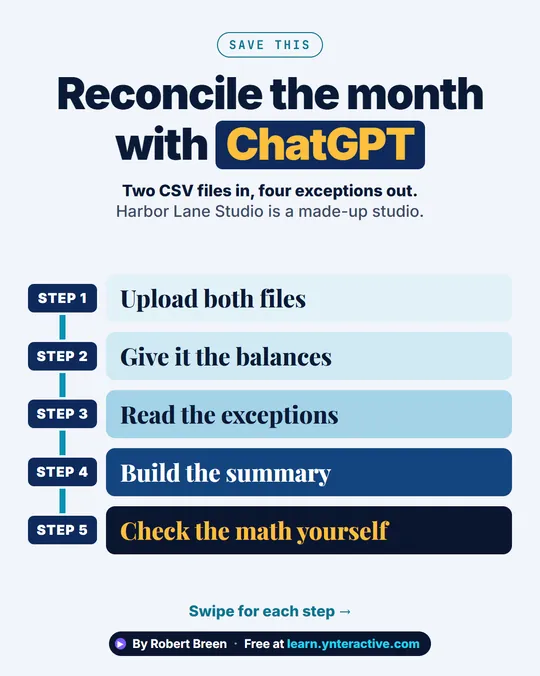
This lesson’s key ideas as quick visual guides: swipe through the slides, or read the same guide as text.
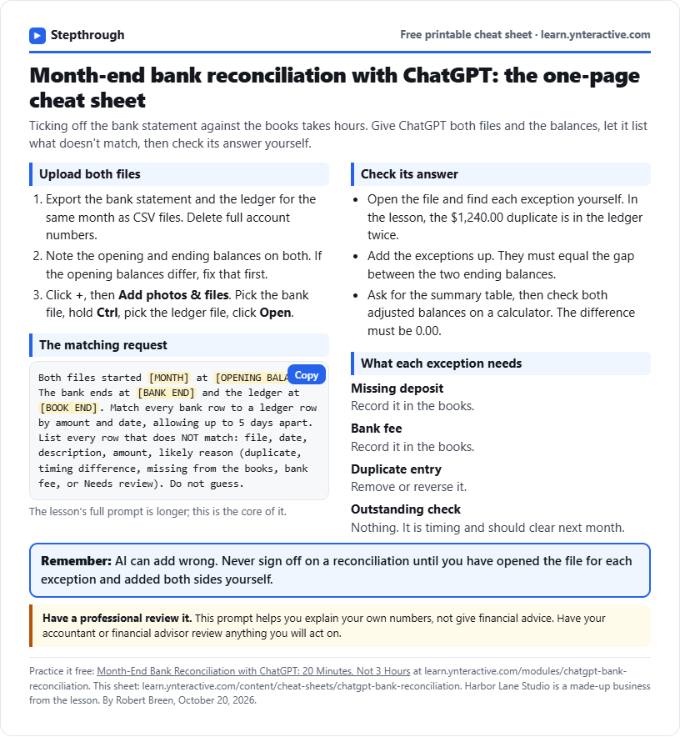
Free cheat sheet
Print it or save the PDF: the key steps and checks from this lesson on one page, free.
All free printable cheat sheets
Terms in this lesson
Plain-English definitions, each with an example from a free lesson.
Related prompts
- Bank reconciliation exceptions memo prompt: A copy-ready prompt that turns a reconciliation's exception list into a short memo for the owner: what each row is, the fix, and…
- Payment matching prompt: Copy this ChatGPT prompt to suggest which open invoices a customer payment covers, flag short payments and list what a person…
More terms on this topic
More prompts on this topic
- Estimated tax payment reminder prompt: Remind a client about an upcoming estimated tax payment using your firm's numbers: amount, due date, how they pay, and who to…
- Tax extension explanation email prompt: Explain a filed tax extension to a worried client in plain words: what was filed, the new deadline, what was paid, what's…
- Tax season client checklist prompt: Turn last year's documents into a personal tax-season checklist email for each client: what to send, where to find it, how to…