This guide is for founders, sales reps and sales managers at small B2B companies who already use ChatGPT and want inbound leads sorted before they pick up the phone.
What does lead scoring mean?
It means adding up signals about a lead into a number or a label. The lead scoring glossary entry defines it as a system that adds up points for each lead based on who they are and what they've done, such as company size, job title, pages visited or a demo request. The total ranks leads so the team works the best ones first.
Why bother? When a handful of inquiries arrive each week, a person can read them all. When dozens arrive, judgment gets uneven: the Monday morning lead gets a careful look and the Friday afternoon one gets skimmed. A score applies the same rules to every lead, every time.
What signals go into a lead score?
Two kinds: fit and interest.
- Fit asks whether this is the kind of customer you serve well, such as the right industry or team size. Your ideal customer profile describes good fit.
- Interest asks how engaged they are, such as asking for pricing, booking a call or naming a deadline.
The combination tells you what to do. A lead that fits well but shows little interest needs patience. A lead with lots of interest but poor fit may need a polite redirect. Start with three or four signals you already collect; a score built on data you never capture is empty.
Do small teams need points, or are labels enough?
Labels are usually enough at first. The glossary entry says so directly: three named buckets with written rules do the same job with less upkeep, and points become useful when lead volume makes sorting by hand slow.
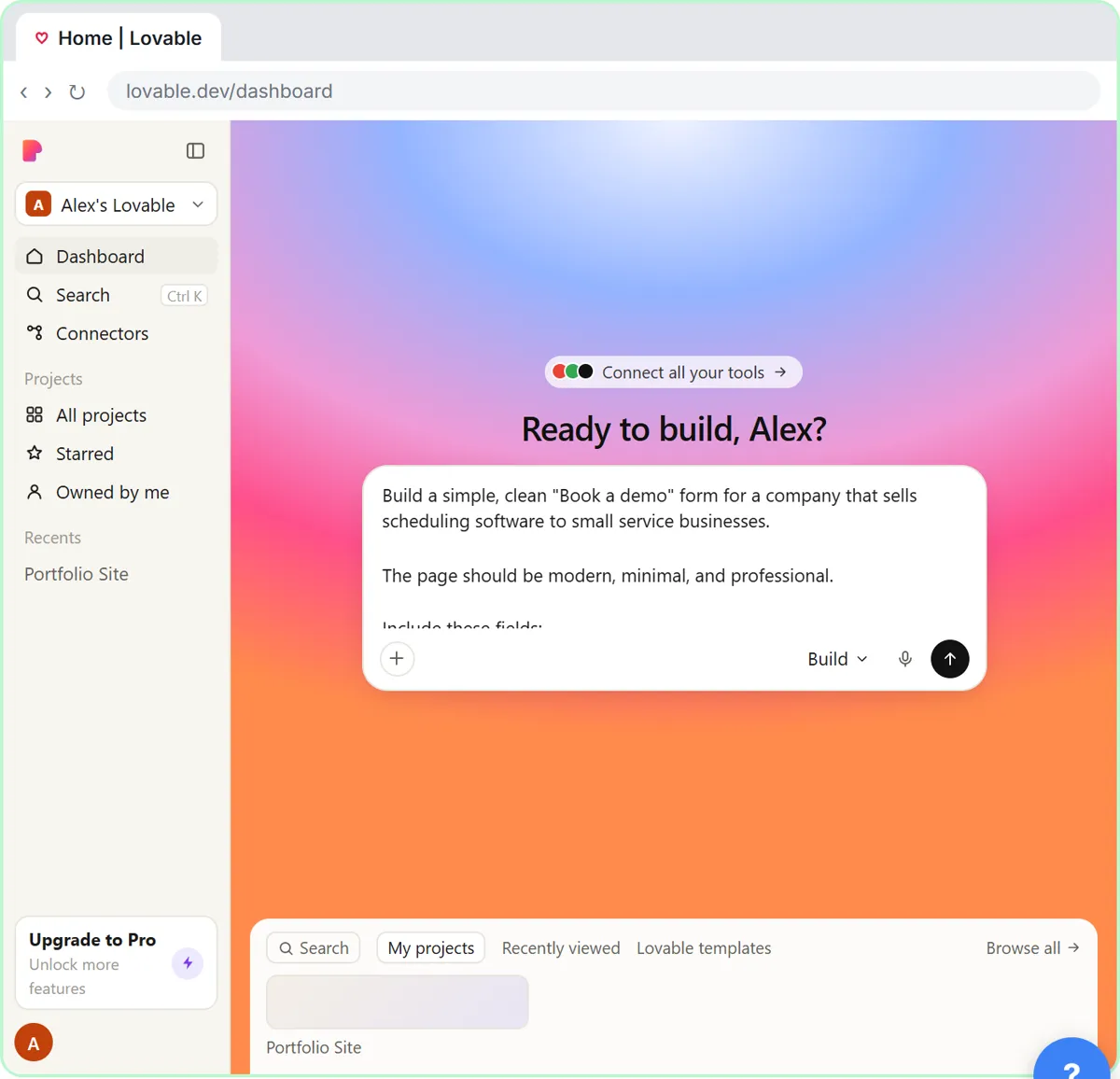
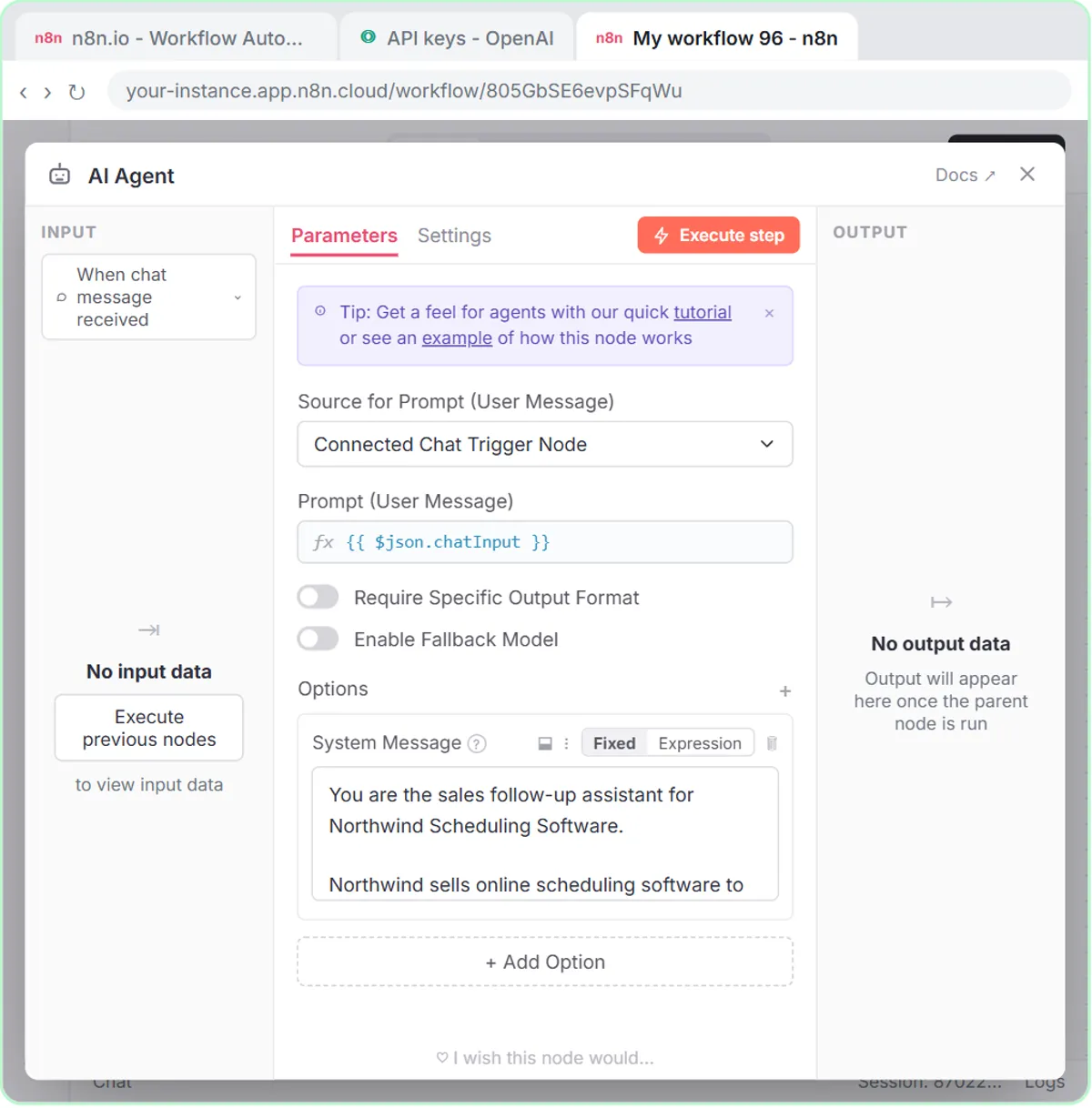
The lesson uses labels. Northwind Scheduling Software, a made-up company, collects four answers on its Book a Demo form: Name, Email, What do you need help with? and Team size. The AI Agent's system message turns two of those into a label:
| Label | Rule in the system message | Next step in the email |
|---|---|---|
| Hot | 5 or more staff and a plan to switch within a month | Two demo times this week |
| Warm | A clear need but no timeline | A link to book a demo |
| Nurture | Just looking | A helpful guide, no pressure |
Team size is a fit signal; the switching timeline is an interest signal. That's lead scoring with the arithmetic left out.
How does AI apply the rules?
It reads each request and matches it to the rule that fits, which is hard to do with formulas when people answer in their own words. In the lesson:
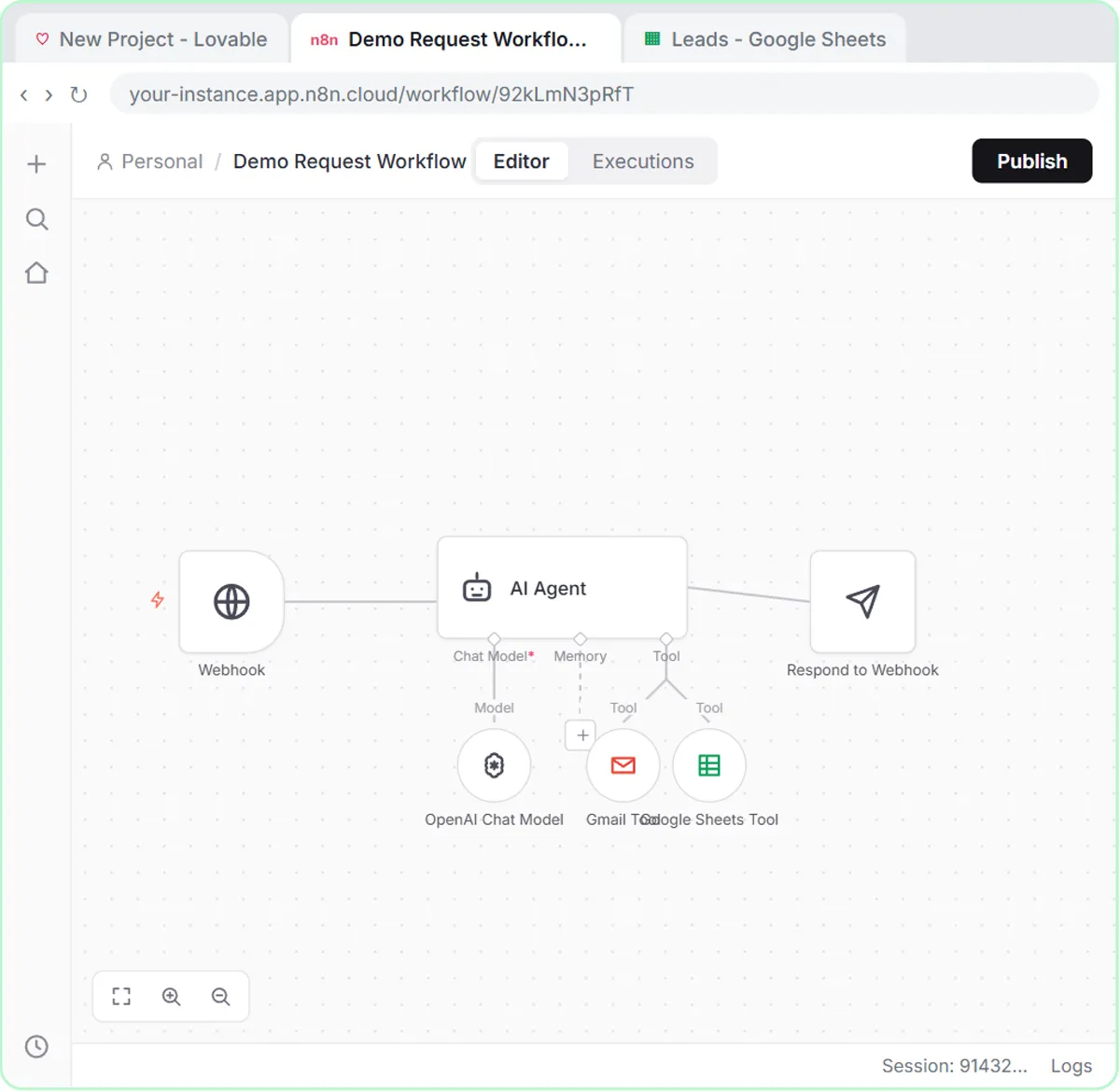
- The Lovable form sends each submission to an n8n workflow that starts On webhook call.
- An AI Agent reads the request and follows the system message with the three labels.
- A Google Sheets Tool adds the lead to a sheet called Leads.
- A Gmail Tool emails the prospect the next step for their label.
- A Respond to Webhook node tells the form it worked.
Step 1 is a webhook, and steps 2 to 4 call the OpenAI, Google Sheets and Gmail APIs. Webhook vs API explains the difference in plain words.
In the test, Dana Whitfield writes that her company schedules 12 cleaners on a spreadsheet that keeps breaking and wants to switch this month. The agent rates that Hot, saves the row and emails two demo times this week.
Try it free, step by step
Build an AI Demo Request Form That Qualifies Leads. Build a "Book a demo" form in Lovable for Northwind Scheduling Software and connect it to n8n — the AI agent rates each lead hot, warm or nurture, saves it to Google Sheets and emails the right next… You do every step yourself in a practice copy of Lovable and n8n, it checks your work as you go, and “Do it for me” finishes any step you get stuck on. Free, and nothing touches your real accounts.
Start the free lessonOne detail from the lesson's FAQ: the Leads sheet stores the four form fields, and the label decides which next step the email offers. If you want the label in the sheet too, add a fifth column in your own build.
How do I turn labels into a real score later?
Give each signal a few points and pick a line for each label. The glossary entry sketches it for Northwind: a few points for team size and a few more for a near deadline, with Hot meaning a total above a line the team picks. The lesson doesn't build that, and you don't need to until volume demands it. The point is that the rules come first, and a score is just those rules written as numbers.
Whichever you use, ask the AI to explain its rating in one line, so a person can see why a lead scored high, and check scores against reality once a month: did the high scorers actually buy more often?
What happens after a lead is scored?
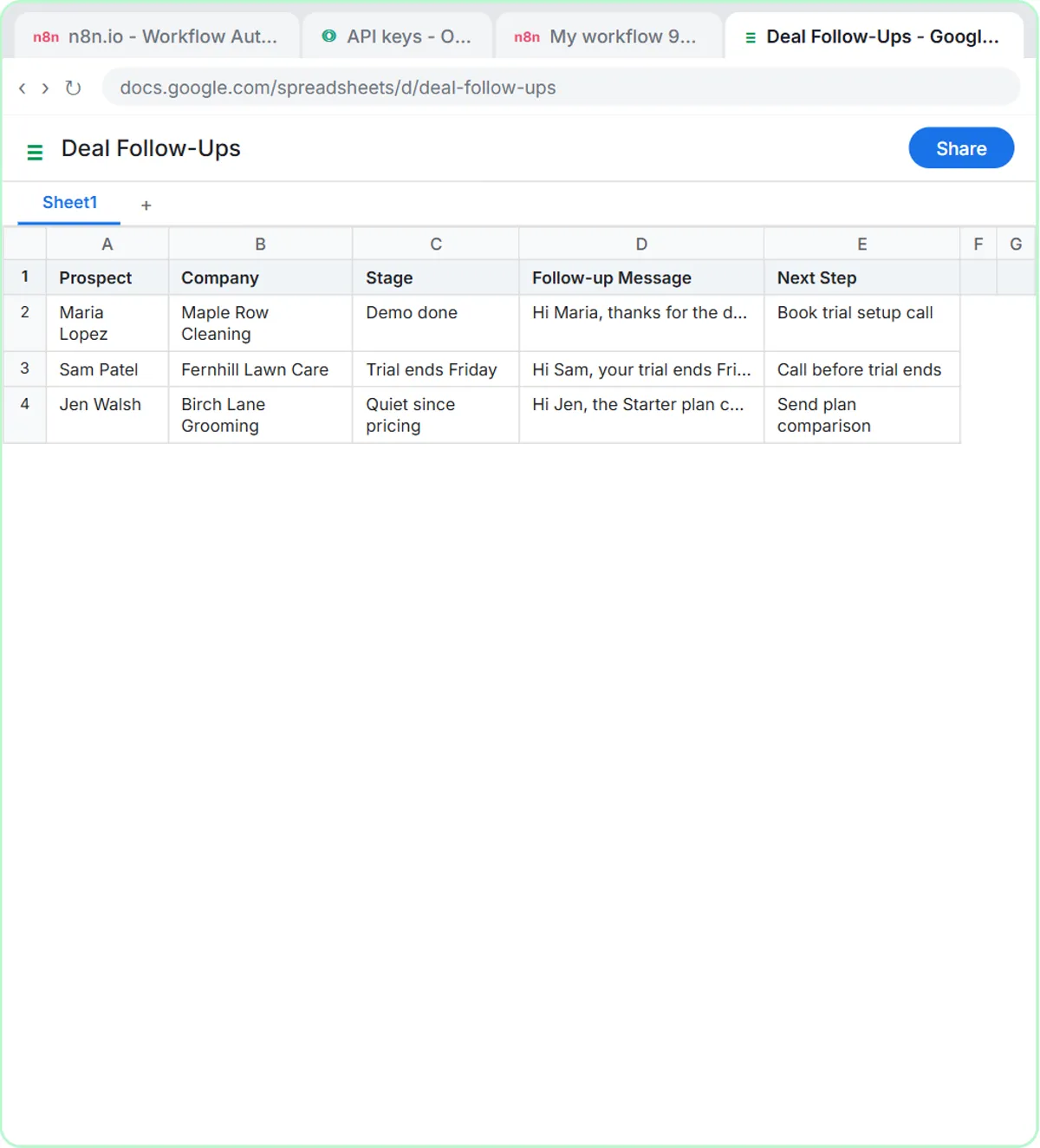
The follow-up should match the label, and later the deal stage. The AI Deal Follow-Up Agent lesson picks up there: you paste open deals into an n8n agent, and it writes a different message for each stage, such as a recap after a demo, a check-in before a trial ends, or a no-pressure note for someone who went quiet after seeing pricing. Each message stays under 80 words, ends with one clear ask and never invents prices, discounts or results. Every message lands in a Deal Follow-Ups sheet so a rep can check it before anything is sent.
Speed matters as much as the score. What Is Speed to Lead? explains why the first reply should go out fast, and for leads that go quiet anyway, Follow-Up Email After No Response covers what to send next.
What does it cost to build?
The lesson is free and runs in a practice copy. To build it for real you need your own Lovable, n8n, OpenAI and Google accounts. The OpenAI API is pay-as-you-go and billed separately from a ChatGPT subscription, and Lovable and n8n have their own paid plans, so check each one's current pricing. The sales industry page lists the other free sales lessons.
A privacy note: every submission, including the prospect's name and email, passes through n8n to OpenAI and lands in your Google Sheet. Ask only for what you need to rate a lead, mention on the form how you'll use the details, and follow your company's policy on customer data in AI tools.
Glossary terms used in this post: lead scoring, lead qualification and speed to lead.
Key takeaways
- Lead scoring ranks new leads using fit signals (such as team size) and interest signals (such as a deadline), so the best ones get worked first.
- Small teams can start with three labels, Hot, Warm and Nurture, each defined in one sentence, instead of a points system.
- In the free lesson, an n8n AI Agent rates each Lovable form submission, saves it to a Leads sheet and emails the next step for that label.
- Ask the AI to explain each rating in one line, and check monthly whether high-rated leads actually buy more often.
- Turn labels into points only when lead volume makes sorting by hand slow.
Frequently asked questions
- What is the difference between lead scoring and lead qualification?
A score is a ranking built from signals. Lead qualification is the decision about what to do with a lead, which a score can feed. You can qualify without scoring by using a few clear labels.
- Can AI score leads accurately?
It can apply your rules consistently to free-text answers. It can still misread a vague answer, so review a sample of ratings each week and tighten the rules where it gets them wrong.
- Can I change what counts as a hot lead?
Yes. The rules are plain sentences in the system message. Edit them to match your own team size, timeline or budget criteria.
- Do I need to code to build this?
No. Lovable builds the form from a written prompt, and the n8n workflow is built by clicking nodes and pasting text.